Showing posts with label Graphic Designing. Show all posts

Blumentals Easy GIF Animator Pro 4.8.1.39 - ♥

Tuesday, April 28, 2009

RAPIDSHARE LINK;
Blumentals Easy GIF Animator Pro 4.8.1.39 | Size: 1.72 MB

Easy GIF Animator is powerful yet very easy to use software for creating and editing animated GIF images. With this animated GIF editor you can easily create animated pictures, banners and buttons in no time. You can use special features to add stunning visual effects and prepare your animation for publishing on your web page. Easy GIF Animator supports all types of GIF animation and provides high compression and great quality for your animated GIF images. To top it all off, Easy GIF Animator is the best priced animated GIF editor on the market today.

With Easy GIF Animator You Can:

Easily create animated banners, pictures and buttons [View samples]
Create animated GIF images from scratch
Edit and modify animated GIF images
Add visual effects to your GIF animation
Create moving text effects
Optimize animated GIF images so they take less space and load faster
Preview GIF animation in web browser
Resize whole animations at once
Manage animation frames
Set animation loop count and frame duration
Extract separate animation frames
Reverse GIF animation or a portion of it
Easily set transparency
Add sound to your animation
Save animation in SWF Flash format
Search the Web to find images for use in your animation
Export GIF animation to AVI format
Use GIF, JPG, PNG and BMP images in your animation
Generate HTML code for publishing animation on the web


Easy Icon Maker - ♥

RAPIDSHARE LINK; Size=3MB

Easy Icon Maker is a small and easy-to-use all-in-one icon utility for icon making, editing, changing, extracting, searching, and exploring.

It allows you editing a transparent or opaque icon. The sizes may be 16 X 16, 32 X 32, 48 X 48, 64 X 64 or custom it as you like. The colors may be Monochrome(1 bit), 16 colors(4 bits), 256 colors(8 bits), true colors(24 bits), or true colors + alpha channel(32 bits).

With Easy Icon Maker, you may edit your own professional icons easily and quickly with the built-in editor. You may also extract an icon from an EXE or DLL file. You may import graphic file such as BMP, JPG or GIF and save it into icon file or export icon file to graphic file.

A capture button allows you capturing any area on the screen to the editor for editing. Filters functions allow you processing the icon with special effects such as lighten, soften, darken, lighten, blur, emboss, and more.

Key Features include:

  • Support sizes 16 X 16, 32 X 32, 48 X 48, 64 X 64, and user custom

  • Support Monochrome (1 bit), 16 colors (4 bits), 256 colors (8 .bits), true color (24 bits), and true colors + alpha channel (32 bits)

  • Support capturing an icon area from screen

  • Fast, small and easy-to-use

  • Windows XP Compatible

  • Extract icon from DLL/EXE files

  • Icon Searcher Tool - Search Icons from your computer files

  • Icon Changer Tool - change binary file's icons (EXE, OCX, DLL, SCR, ...)

  • Import from or Export to graphic files BMP, JPG, GIF


UNIQUE GIFT MAKER- DOWNLOADBROS

Friday, April 3, 2009

UNIQUE GIFT MAKER V 2.5; RS LINK + MEDIAFIRE LINK; SIZE=8MB

Unique Gift Maker description
Unique Gift Maker helps you create greetings, questions or anything you want to say in the form of a flash e-gift
Have you got ready any gift baskets, greeting card for Valentine's day, Christmas, Birthday of your friend or any special occasion? If you want to make gift baskets which could be remembered forever, try UniqueGift Maker. UniqueGiftMaker is a software that will help you make your greetings, questions or anything you want to say in the form of a flash e-gift. You can use UniqueGiftMaker to create E greeting card for your friend, E workout for your son, E Love Letter for your sweetheart, E Photo Album for your wife, E Recipe for your mom, e Fun Story for your child, e Questionnaire for your customer and e SlideShow for your work. No matter where she is, the gift of Unique Gift Maker can be sent to him rapidly though internet. It'll be more valuable and significant.You might have to make use of UGM more than 50 times in a year (nearly once a week). Before every festival many kinds of gift's theme, background and music could be downloaded free by members.Each theme shown their designer's ideas.Here are some key features of "Unique Gift Maker":· More novel and powerful · A gift itself · New interface with skin · Dynamic e-gift · Auto get the answers from the receiver by email. It's amazing! · Slide show is offered · Add e-gift baskets · Safer and more reliable · Easier and more convenient · Show me your imagination
Here are some key features of "Unique Gift Maker":· More novel and powerful · A gift itself · New interface with skin · Dynamic e-gift · Auto get the answers from the receiver by email. It's amazing! · Slide show is offered · Add e-gift baskets · Safer and more reliable · Easier and more convenient · Show me your imagination

RAPIDSHARE LINK

OR

MEDIAFIRE LINK

MEDIACHANCE EDIT STUDIO - Downloadbros

EDIT STUDIO; RS LINK + MEDIAFIRE LINK; SIZE=26MB
MEDIACHANCE EDIT STUDIO
EditStudio PRO is different from many other video editing applications in this price range. It is a full video editing package with standard windows interface, professional quality tools and results. It is a flexible tool that offers all types of standard and advanced video capturing, editing, MPEG2 encoding and Subtitling in one package.
High-Quality MPEG-2 encoding
Because EditStudio uses one of the most advanced Mpeg-2 encoder, it is a great companion for DVD authors and will let you produce highest quality DVD files.The Advanced MPEG settings allows you to tweak every aspect of the encoder - something you can't find in many other encoders or editors.
Fresh and Clean Video Editing Approach
You will soon discover one of the EditStudio strongest feature - the unlimited stackable effects and transition layers.Instead of applying the effect directly to a video track, you can use the effect tracks instead.
This makes handling the project much easier and much more visually oriented than in other applications. It is easy to position the effect to the exact frames without splicing the video. It is easy to move the effects or resize them in timeline or even copy and paste them without touching the video tracks!And you can even add key-frames to the Effects themselves, allowing for example for smooth transition from one color correction setting to another.
Add Subtitles and Chapter Marks
Adding frame accurate subtitles using subtitle Marks is now much easier with EditStudio PRO. You have the benefit of hearing and seeing the exact scene and the audio. The subtitles are also displayed on the Preview monitor during playback, making it easy to evaluate the timing. Then at the end you will just export them as *.SUB files that you can use in DVD-lab PRO or other professional DVD authoring application.
Easy to use, innovative Multi-Camera Editing Thanks to the EditStudio unique layered Effects, multi-camera editing uses very clean approach. No splicing and dicing of your videos. The switching between different cameras is done right on the Effect layer, without actually touching any of your synchronized videos. And adding transitions between the cameras is equally simple, just add it over the cut on the Transition Layer!

PRO Tools as wellYou will be surprised to find many professional tools such as Vectorscope, Waveform, RGB Parade, Tone and Bar generators, IRE safe Colors, 3-point Color correction, Chroma/Luma-key, Quick Matte etc.
Most affordable full featured application
There are many video editing applications, but few are both affordable and offers such a strong list of professional features.
Because of our price policy, EditStudio PRO is very affordable. Even if you already own any other Video Editor, you will greatly benefit from the other EditStudio features such as enhanced MPEG encoding capabilities or Subtitle editing. And at the end you will probably find EditStudio more enjoyable than the editor you are currently using.
Features
EditStudio Pro supports many advanced features:
Unlimited Composition layers for Video, Text, Audio and Effects
Key-frame editing
3 point colour correction; this provides advanced color correction and color matching
Digital photo quality levels and curves controls
Chroma and Luma Key
Vectorscope, Waveform and RGB Parade scopes
AVI, MPEG-2, MPEG-1, HDV HD1, HD2, Windows Media and QuickTime export
Editing enhancements: autoripple, cut out, trimming in timeline, delete space, auto audio crossfade
Audio manipulation - 5 band equalizer, speeding, slowing
Adding Subtitles
All the expected Editing ToolsYou can trim items directly on timeline with support for slip editing, to retain the items running time. Interactively adjust audio volume, balance and pan via rubberbands. Version 6 adds easy J and L cuts for linked items.
Composing FeaturesInteractively drag to move and resize the bitmap or video placement to create dynamic picture-in-picture or motion effects (ie. the "Ken Burns- effect)Motion paths can include mixture of linear and spline curves. Objects can be moved and resized by dragging with the mouse or entering coordinate values for accurate placement with instant feedback.
Effects & TransitionsThere are not many other applications that come already with such a great variety of pro-grade effects. Chroma Key, Luma Key, Realistic Old Film effect, Flare, Color and Gradient filters, Route Tracer for animated routes or graphs, Knock Out for removing on-screen text or graphics and much more. Effects can be applied also only to a circular or rectangular region of frame. For example you can blur out a face of a person and then keyframe the blur region to move with the person.There are also many user customizable transitions, over 100 transitions are provided, more available through Herb Garden.
Text and TitlingVery few packages come close to the text functionality of EditStudio. Titles supports stationary text, as well as scrolling text, credits and crawling motion with many motion presets. You can mix fonts and styles, outline, glow or drop shadow. But that's not all! Letters of title can ripple, twist, come to screen one after another or use staggered effect. You can also insert a special purpose tag that can display a counting timecode or frame number (for example for creating production copies)
KeyframesHere we go to the area where only true professional packages will let you. You can set key-frames for frame (video, image) placement, audio and many effects, then edit key-frames directly on the timeline. Linear, step and spline interpolation types are supported, along with ease in / out acceleration.
CaptureEditStudio has integrated analogue and DV capture with automatic scene detection using optical or DV timestamp methods. Also you can preview directly into DV device.
Fast, real-time previewEven with mpeg-2 files used as an input the software is fast.
No non-sense effectsThe vast number of built-in effects are all made to be used in the real life. You will find lots of useful color, balance, fade, flare, key, matte and other effects.
MPEG-2, HDV HD1, HDV HD2 and DVD readyYou can both input and output MPEG-2 DVD files, because in the price is included MPEG MainConcept based encoder/decoder to read and write MPEG-2 and MPEG-1 files. You can also export to HD1 and HD2 MPEG files.
Minimum PC Requirements- 500 MHz Pentium 2 processor, or above (DV/DVD-size editing)- 256 MB RAM- Windows XP- Graphics card capable of 1024x768 resolution, full colour- Sound card
QuickTime 6 and newer is required in order to import and export QuickTime movies, as well as some graphics formats.NTFS volume in Windows 2000 or XP is strongly recommended (no size restriction)

RAPIDSHARE LINK

or

MEDIAFIRE LINK

FACEFILTER STUDIO 2 - Downloadbros

Tuesday, March 31, 2009

FACEFILTER STUDIO 2; RAPIDSHARE + MEDIAFIRE link; SIZE=21MB
FACEFILTER STUDIO 2

Natural Expression EnhancementFaceFilter
Studio's proprietary 3D muscle-based photo morphing technology lets you fine-tune facial expressions naturally such as adding a smile, widening eyes or raising an eyebrow.
Remove bad expressions
Change facial expression
Open and widen eyes
Adjust head proportion & width
Slim/Fatten face
Revamp & Beautify faces
Improve balance

Skin Enriching Technology
Enhance the skins appearance with subtle color adjustment to improve skin color, add a suntan or whiten. Improve skin's complexion and smooth the texture by reducing wrinkles, lines or rough skin.
Adjust skin color
Hide skin flaws such as spots, freckles, moles, birthmarks and acne
Eliminate wrinkles, lines or rough skin
Remove oily skin & glossy reflections
Reduce dark lines around the eyes

Powerfully Smart Photo Color Correction
Automatically improve the color, contrast, and dynamic range of any image.
Auto-detect human face and skin color to create vibrant colorful photos
Improve color balance
Global color adjustment
Automatic Red-eye reduction
Fix over/under exposure
Enhance backlit/washed-out

Simple, yet powerful
5 step automated processGet superior results faster than any other photo editor! Automatic facial feature mapping automates and greatly simplifies the demanding editing process.
5-step process
Import high-resolution photos up to 12 Mega pixels in size for editing
Print instant photo-stickers with various mood expressions
Automatic facial feature recognition
Blended layers for easy editing
Copy/Paste to support external applications
Wide range of export formats: .JPG, .GIF, .BMP

RAPIDSHARE LINK

or

MEDIAFIRE LINK

Dream Light photo editor downloadbros.blogspot.com

Saturday, March 28, 2009


DREAMLIGHT PHOTO EDITOR; RS LINK; Size=7MB

DreamLight Photo Editor is an image editing software to add many dream effects onto your digital photo. With DreamLight Photo Editor, just by mouse clicking, you can add many wonderful effects: Preset filter, Light filter, Star filter, Amazing filter, Dream filter, Weather filter, Gradient filter, Color filter, Art filter, Texture filter, Edge filter, all including multiple effects. There are totally 150 single special effects for you to choose. Besides using the single effect, you can also use multi effects onto one photo. For example, first use one of Light effects, second use one of Star effects, then use one of Edge effects etc. By this way, you will create thousands of different special effects onto your photo.


RAPIDSHARE LINK

RECOLORED V 1.0 - DOWNLOADBROS

RS LINK; SIZE= 8MB
Product Overview
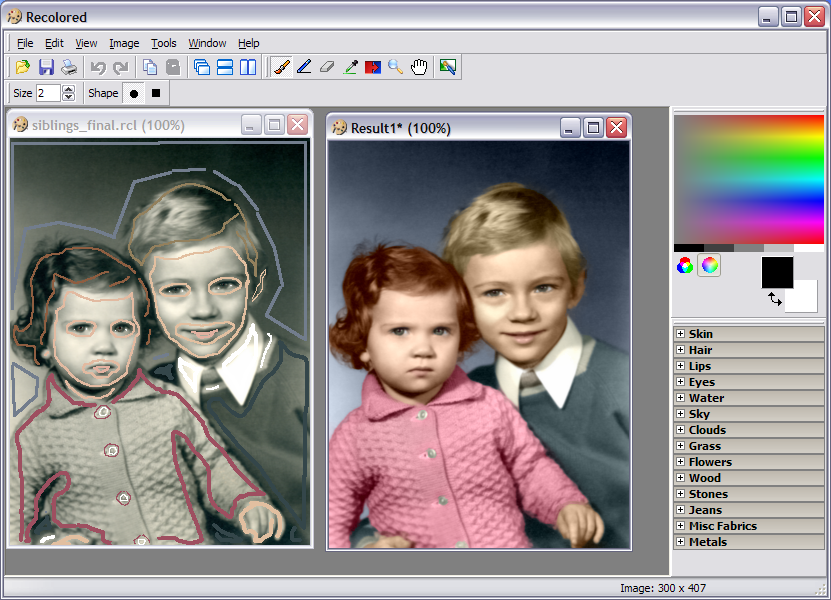
A software tool for colorizing black and white photos, replacing colors in color photos, and applying other effects to digital images.
What it does
Colorization of black and white photos
Perhaps the most exiting application of Recolored lies with adding color to old black and white photos, through a process called colorization. This process has traditionally been done by hand, requiring great skill and patience to achieve good results. Recolored gives anyone — from computer novice to expert graphical designer — the chance to achieve professional looking results with little effort.
Replacing colors in color photos
If you've ever wondered what your house would look like in a different color now is your chance. Using Recolored you can change the colors of individual objects without affecting the rest of the image. All it takes is a few brush strokes, there's no need to struggle with layers or complicated tools in expensive graphics packages.
Selective desaturation
Turn color photos into black and white photos while preserving color of specific important elements to add style and artistry.
How it works
Recolored uses sophisticated algorithms to process digital images, but it needs some help to complete the process. Using brush strokes the user indicates which colors different objects in the image should have. The graphical user interface sports several tools and functions that helps the user draw strokes and select fitting colors in an efficient manner. When the user is done the software takes over and propagates the colors from the brush strokes into the rest of the image. Recolored uses the grayscale intensities from the original to accurately blend in colors, and it takes care to mix colors appropriately near object boundaries.
Color library
The most difficult part of colorizing an image is often deciding which colors to use. To help you select colors that appear natural, we have put together a library of color presets that is included in Recolored. The colors are grouped into categories such as skin tones, hair colors, metals, wood, grass, fabrics and many more.
Feature summary
Easy to use Graphical User Interface
Supports working with multiple images at a time
Seven graphical editing tools
Selectable HSL and RGB color palettes
Color presets for selecting natural looking colors
Unlimited undo / redo levels
File formats: JPEG, PNG, BMP, RCL (proprietary file format)
Images can be printed (adjustable scaling)
Documentation readily available through the integrated HTML help file
Five easy to follow tutorials

RAPIDSHARE LINK

AMS PHOTO EFFECTS STUDIO V 1.35 -DOWNLOADBROS.blogspot.Com

Friday, March 27, 2009

RS LINK ; SIZE= 25MB

AMS Photo Effects Studio is a new program that will easily change your photos with the help of hundreds of unique filters. Professional photo effects are now available for everyone! Just select the necessary effect and enjoy the perfect result in a couple of seconds.
The program allows you to add fantastic glows and fog, generate the effects of rain, snow, lightning and a starry night... You will be able to create the effect of an old photo, pencil drawing, mosaic, engraving, book illustration and much more. Photo Effects Studio also includes a set of unique filters, for example, poker-work, cubism and photomontage.

You will also be able to make your photos more stylish with the help of frames and masks and also add text and decorations. The program includes a large collection of classic and modern frames to any taste. They will add a final touch to your composition.

A lot of effects, the possibility of their combination and also the comfortable interface of the program offer you limitless freedom for creative work!

Photo Effects Studio main features:

1. Comfortable and easy-to-use interface.
2. A wide choice of photo effects many of which are unique.
3. A lot of features for processing and decorating photos.
4. Thousands of filter combinations.


RAPIDSHARE LINK

PICTURE COLLAGE MAKER PRO 2.0.5 + keygen + serial


RS LINK ; size=50MB ; graphic software
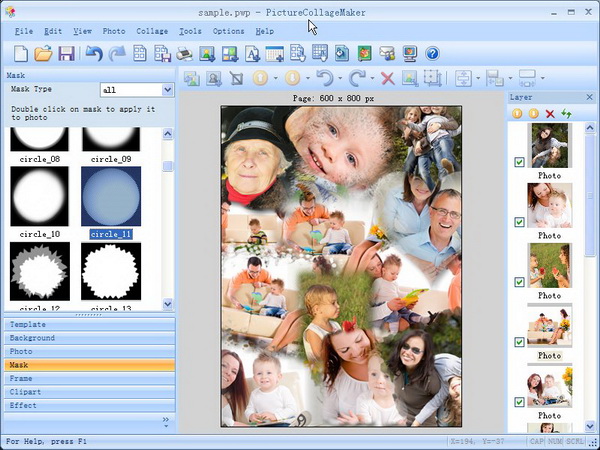
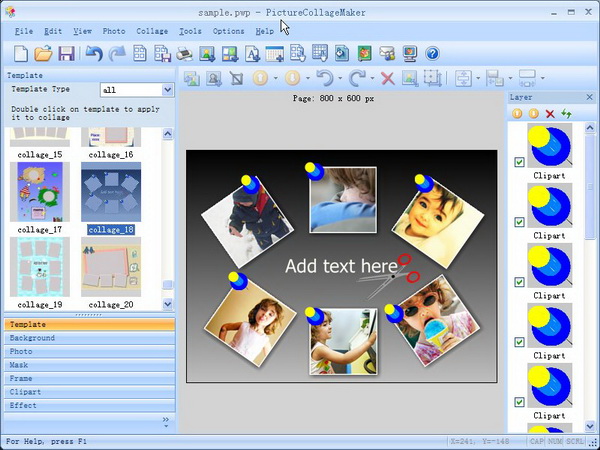
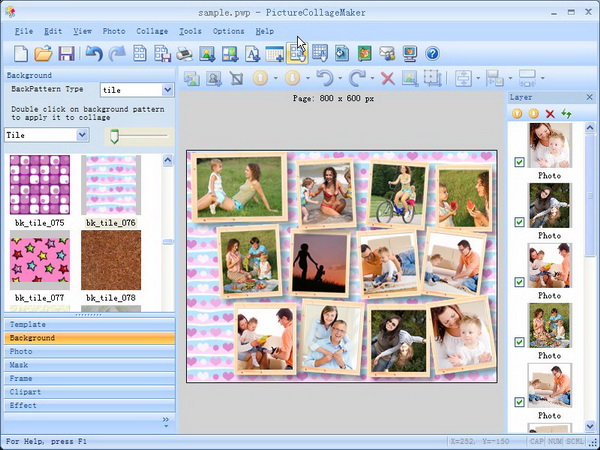
Picture Collage Maker is a pictues and photos collage software that you can use to create cool photo collage with your digital pictures and photos. Creating stunning picture collage has never been easier! Just select your photos and drop them in this tool, add a custom mask, choose from over 10 templates, save as jpg file set wallpaper and make wallpaper slideshow.
You can choose from a variety of template layouts or create your own design from scratch, apply image frames, masks, drop shadows and other effects. The images can be cropped and resized to fit, and freely arranged within the collage. The program supports drag and drop image placements, resizing and multiple layers of images and clipart decorations. The result can be saved as new JPG image and/or set as desktop wallpaper.
You can also create your calendar, greeting card, invitation card, poster and more you can think of! Whether you see collaging as a relaxing pastime or a way of life, Picture Collage Maker can improve your efficiency, save you money and help you transform your priceless pictures into precious memories.
Features:
• Easy to Use - Extremely easy to use. No Experience Or Computer Skills Necessary!
• Create Collage - Allows you to create a mixed–image collage page by compiling various pictures of any size; then you can overlay, arrange, adjust and configure the images to match your taste.
• Photo Collage Wizard - Offers a way to create a photo collage automatically, with selected photos and a single click of a button.
• Real-Time Editing - Allows you to see your collage changes immediately, without saving and reopening the file.
• File Formats - Capable of processing most major graphic formats (JPG, BMP, TIFF, GIF, WMF, TGA, PNG etc)
• Default Templates - A large number of predefined layout designs or templates contained within Picture Collage Maker. You can use either preset templates or create your own page layouts.
• Frames and Boarders - Included. A large number of borders and frames are available in the collage program.
• Backgrounds - Included. A large number of backgrounds are available in the collage program.
• Clip Art - Included. A large number of cliparts are available in the collage program.
• Photo Masks - Included. A large number of masks are available in the collage program.
• Download Additional Clipart, Backgrounds, Masks and Frames - Offers additional collage resources online.
• Layers - One image can overlap others on a collage page; you choose the order in which to layer the images by moving a selected layer to the back or to the front. You can delete layers you don’t like and replace them with new images.
• On Screen Text Entry - Opens a text box on your photo collage project. You can resize and move the text to a precise location on your collage page.
• Editable Text - Allows you to make changes to collage text, such as font style, size and color.
• Move,Rotate, Resize, Flip Images - Move,Rotates, resizes and flips images inside a frame.
• Photo Cropping - Allows you to trim away areas of your collage photo.
• Move Frames - On a collage project template page, you can rearrange the pre–set frame display.
• Delete Frames - Erase a frame from your collage resource files.
• Stretch Frame to Fit Page - Decrease or increase frame size so it fits the collage project.
• Page Orientation - Landscape. Sets the collage project page horizontally at 11 inches wide by 8.5 inches tall. (Other collage page sizes are available.)
• Page Orientation - Portrait. Sets the collage project page vertically at 8.5 inches wide by 11 inches tall. (Other collage page sizes are available.)
• Filters and Photo Effects - Advanced photo editing tools allow you to stylize the look of collage images through the use various filters, such as a grayscale filter, sharpen filter, and a blur filter.
• Light & Color Managemanet - Allows you to edit image light and color. Picture Collage Maker give you nearly as much control as offered in basic photo editing software packages.
• Multiple Undos - Allows you to undo several recent collage changes as a group.
• Send Photo via Email - Send your collage projects to others through email.
• Print - Print your collage project.
• Save Collage as Single Picture - Save your collage project as a single picture.
• Set as Wallpaper - Set your finished collage page as desktop wallpaper or Wallpaper Slideshow.
Microsoft® Windows 98/Me/NT4/2000/XP/2003 Server/VISTA compatible.


RAPIDSHARE LINK