Showing posts with label Picture Tool. Show all posts

Blumentals Easy GIF Animator Pro 4.8.1.39 - ♥

Tuesday, April 28, 2009

RAPIDSHARE LINK;
Blumentals Easy GIF Animator Pro 4.8.1.39 | Size: 1.72 MB

Easy GIF Animator is powerful yet very easy to use software for creating and editing animated GIF images. With this animated GIF editor you can easily create animated pictures, banners and buttons in no time. You can use special features to add stunning visual effects and prepare your animation for publishing on your web page. Easy GIF Animator supports all types of GIF animation and provides high compression and great quality for your animated GIF images. To top it all off, Easy GIF Animator is the best priced animated GIF editor on the market today.

With Easy GIF Animator You Can:

Easily create animated banners, pictures and buttons [View samples]
Create animated GIF images from scratch
Edit and modify animated GIF images
Add visual effects to your GIF animation
Create moving text effects
Optimize animated GIF images so they take less space and load faster
Preview GIF animation in web browser
Resize whole animations at once
Manage animation frames
Set animation loop count and frame duration
Extract separate animation frames
Reverse GIF animation or a portion of it
Easily set transparency
Add sound to your animation
Save animation in SWF Flash format
Search the Web to find images for use in your animation
Export GIF animation to AVI format
Use GIF, JPG, PNG and BMP images in your animation
Generate HTML code for publishing animation on the web


Batch Photo Editor Pro v 2.3 - ♥


RS LINK; Size=6MB

Batch Photo Pro

BatchPhoto is a powerful photo manipulation program that makes it easy to convert, touch-up, annotate, transform, apply effects, and rename hundreds of photos in a single operation. Instead of enhancing and adjusting pictures individually, BatchPhoto lets you select a group of images, define a series of edits, and apply them in a single operation.

With BatchPhoto you can: Convert images (to JPEG, PDF, TIFF, GIF, PNG and 100 more); Resize pictures automatically and even adjust the DPI; Annotate photos with date/time information, comments and watermarks; Rename hundreds of images in one session; Apply special effects like: sepia, black & white, oil paint, charcoal sketch and more; Touch-up photos by adjust the brightness, sharpness, and contrast. Version 2.3.1 has Batch photo editing with multi-core processors support.


FACE SWAPPER - ♥

Saturday, April 18, 2009


MEDIAFIRE LINK; SIZE=5MB

Swap faces between images and create high-quality collages in just minutes!

FaceSwapper makes it easy to cut and paste faces from one picture into another without precision selections or manual color adjustments. The cutting and pasting occurs in 3D space, allowing you to easily match the angle and direction of the target face. No need to use complicated 3D modeling applications or expensive graphical packages. Create high-quality collages in just minutes!

Take your or your friend's face and put it onto the body of a superstar. Swap faces
on a group shot and impress your friends with a fresh look. Or simply make a monument to yourself or your friend by putting a new face onto a famous sculpture or a well-known portrait! FaceSwapper makes the replacement quick, easy and smooth by taking care of every possible aspect of the transplantation.

You won't need to use an accurate selection tool to carefully adjust the original or the target faces. Just click on a face in the source and destination pictures, and FaceSwapper will detect and select both faces completely automatically. Jagged edges? What jagged edges? The selection tool takes care of the original and target backgrounds automatically to seamlessly blend the new face with the background. If the target has different colors or a different gamma, FaceSwapper will automatically adjust the colors and brightness of the face to make it blend with the target image.

Only have a frontal picture of your face, yet the target image looks left or right? No problem! FaceSwapper performs all the adjustments in three dimensions, allowing you to arbitrarily rotate the face in all three dimensions before finalizing the image. Just click and drag the face to create a perfect collage!

MEDIAFIRE LINK

PHOTO TO CARTOON - DOWNLOADBROS

Friday, April 17, 2009

RS LINK ; SIZE=2MB;

Intocartoon Pro is a great piece of software that can create a cartoon instantly out of any picture. So whether you are professional designer or an average computer user, you can easily create fantastic cartoons to impress people. Not only does it creates cartoon it also creates sketches too.
The software gets installed fairly quickly and has an elegant feel to it. The controls are easy and have effortless menu features. Just select the picture you want to convert into a cartoon and use to shortcuts on cartoon tab to create the carton. Then you can go on to the editing options for colouring, adjusting the detail levels or set values for ‘smoothness’ and ‘threshold’ option. The software gives you interesting options to use like multiple layering and various other techniques. The layering feature has two options in the blending mode, namely ‘opacity’ and ‘multiply’. Basically it has various editing features that make it a great tool for professional use. Easy changes can be made in brightness contrast and saturation of the images. Moreover it can also used for making drawn sketches of objects if needed, Sometimes The option for inserting text into dialog boxes that go with the cartoons is very neat. Even an average computer user can position the dialog boxes as per his preference. In few minutes you can virtually create your own cartoon strip with this software. Intocartoon also has detailed menus for history, layering, text controls which pop up as you select the option.
Movement across the interface is quite smooth and software appears competent for high end professional use with minor improvements. With tools for painting, drawing and color dropping and picture grabbing, Intocartoon pro provides professional users with lots of options to produce classy cartoons. It also has a fairly easy Help section that comes in handy for the average users. The software is a delight to work with even for a novice.

RAPIDSHARE LINK

OR

MEDIAFIRE LINK

Dream Light photo editor downloadbros.blogspot.com

Saturday, March 28, 2009


DREAMLIGHT PHOTO EDITOR; RS LINK; Size=7MB

DreamLight Photo Editor is an image editing software to add many dream effects onto your digital photo. With DreamLight Photo Editor, just by mouse clicking, you can add many wonderful effects: Preset filter, Light filter, Star filter, Amazing filter, Dream filter, Weather filter, Gradient filter, Color filter, Art filter, Texture filter, Edge filter, all including multiple effects. There are totally 150 single special effects for you to choose. Besides using the single effect, you can also use multi effects onto one photo. For example, first use one of Light effects, second use one of Star effects, then use one of Edge effects etc. By this way, you will create thousands of different special effects onto your photo.


RAPIDSHARE LINK

RECOLORED V 1.0 - DOWNLOADBROS

RS LINK; SIZE= 8MB
Product Overview
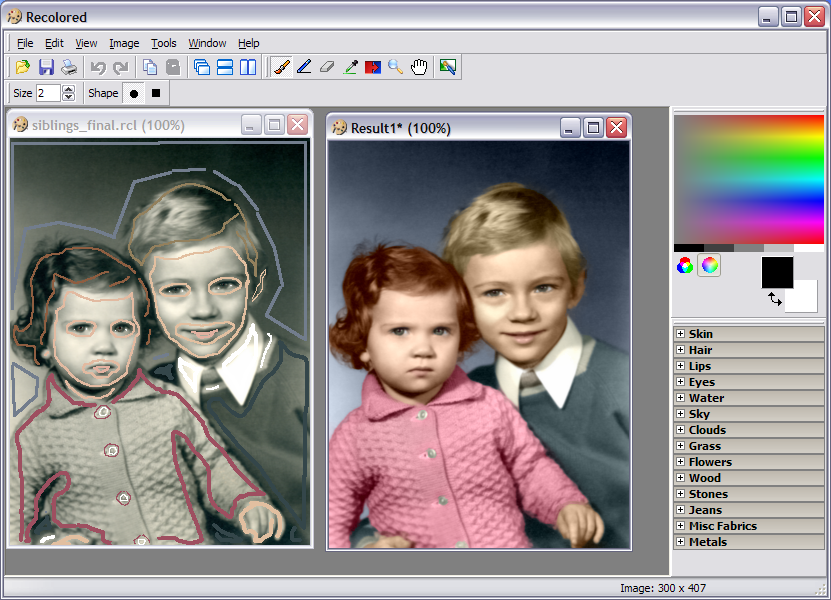
A software tool for colorizing black and white photos, replacing colors in color photos, and applying other effects to digital images.
What it does
Colorization of black and white photos
Perhaps the most exiting application of Recolored lies with adding color to old black and white photos, through a process called colorization. This process has traditionally been done by hand, requiring great skill and patience to achieve good results. Recolored gives anyone — from computer novice to expert graphical designer — the chance to achieve professional looking results with little effort.
Replacing colors in color photos
If you've ever wondered what your house would look like in a different color now is your chance. Using Recolored you can change the colors of individual objects without affecting the rest of the image. All it takes is a few brush strokes, there's no need to struggle with layers or complicated tools in expensive graphics packages.
Selective desaturation
Turn color photos into black and white photos while preserving color of specific important elements to add style and artistry.
How it works
Recolored uses sophisticated algorithms to process digital images, but it needs some help to complete the process. Using brush strokes the user indicates which colors different objects in the image should have. The graphical user interface sports several tools and functions that helps the user draw strokes and select fitting colors in an efficient manner. When the user is done the software takes over and propagates the colors from the brush strokes into the rest of the image. Recolored uses the grayscale intensities from the original to accurately blend in colors, and it takes care to mix colors appropriately near object boundaries.
Color library
The most difficult part of colorizing an image is often deciding which colors to use. To help you select colors that appear natural, we have put together a library of color presets that is included in Recolored. The colors are grouped into categories such as skin tones, hair colors, metals, wood, grass, fabrics and many more.
Feature summary
Easy to use Graphical User Interface
Supports working with multiple images at a time
Seven graphical editing tools
Selectable HSL and RGB color palettes
Color presets for selecting natural looking colors
Unlimited undo / redo levels
File formats: JPEG, PNG, BMP, RCL (proprietary file format)
Images can be printed (adjustable scaling)
Documentation readily available through the integrated HTML help file
Five easy to follow tutorials

RAPIDSHARE LINK

AMS PHOTO EFFECTS STUDIO V 1.35 -DOWNLOADBROS.blogspot.Com

Friday, March 27, 2009

RS LINK ; SIZE= 25MB

AMS Photo Effects Studio is a new program that will easily change your photos with the help of hundreds of unique filters. Professional photo effects are now available for everyone! Just select the necessary effect and enjoy the perfect result in a couple of seconds.
The program allows you to add fantastic glows and fog, generate the effects of rain, snow, lightning and a starry night... You will be able to create the effect of an old photo, pencil drawing, mosaic, engraving, book illustration and much more. Photo Effects Studio also includes a set of unique filters, for example, poker-work, cubism and photomontage.

You will also be able to make your photos more stylish with the help of frames and masks and also add text and decorations. The program includes a large collection of classic and modern frames to any taste. They will add a final touch to your composition.

A lot of effects, the possibility of their combination and also the comfortable interface of the program offer you limitless freedom for creative work!

Photo Effects Studio main features:

1. Comfortable and easy-to-use interface.
2. A wide choice of photo effects many of which are unique.
3. A lot of features for processing and decorating photos.
4. Thousands of filter combinations.


RAPIDSHARE LINK